
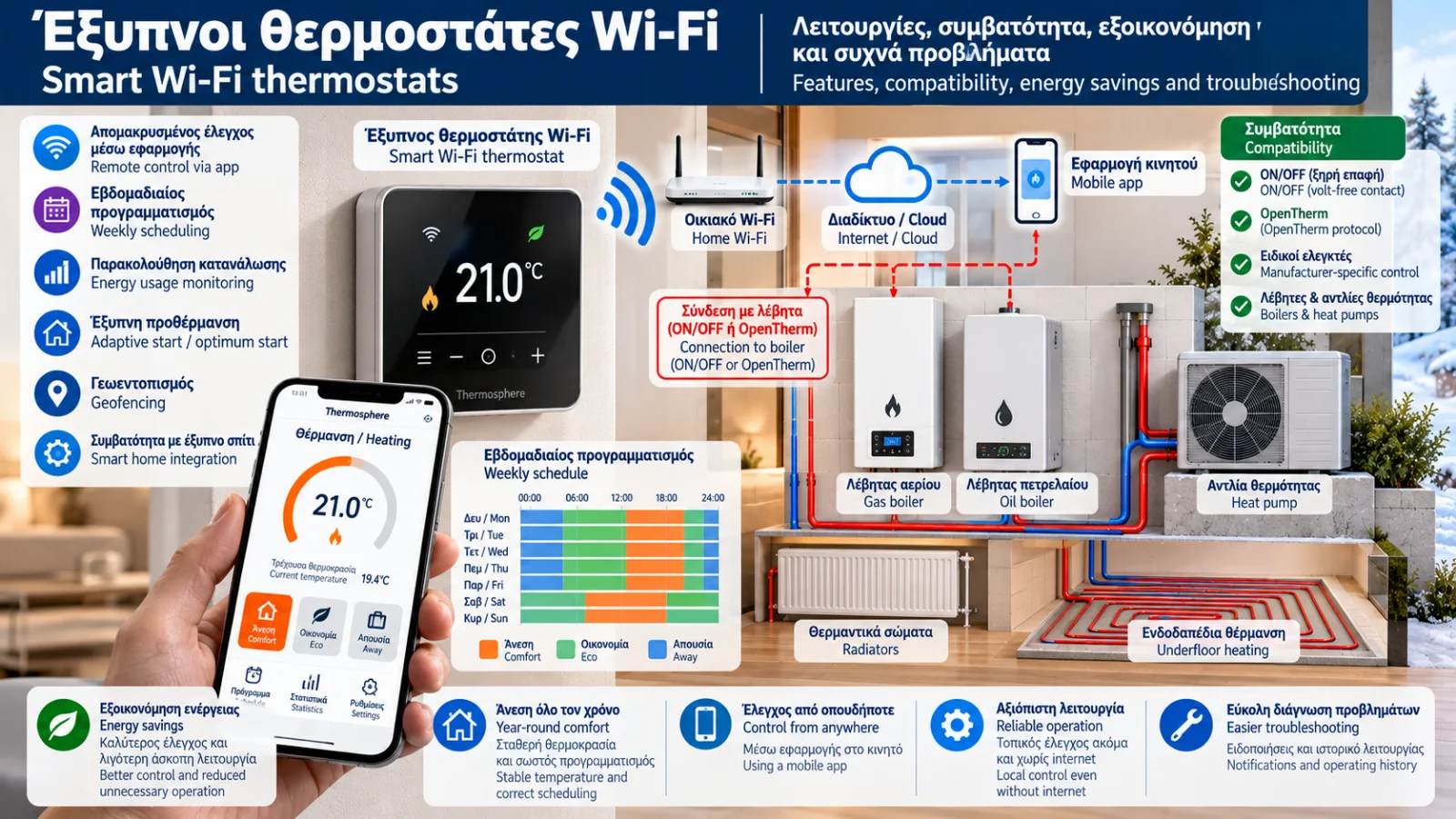
Smart Wi-Fi Thermostats: Features, Compatibility, Energy Savings and Troubleshooting
Smart Wi-Fi thermostats provide modern heating-control capabilities for homes and commercial buildings. They combine the basic function of a room thermostat with scheduling, remote management and, in some models, adaptive control features.
These devices can make temperature management more convenient and help reduce unnecessary heating operation.
However, a smart thermostat does not automatically guarantee energy savings. Actual results depend on user behaviour, heat-source compatibility and correct configuration.
Furthermore, not every Wi-Fi thermostat is suitable for every boiler or heat pump.
This Thermosphere.gr technical guide examines their operating principles, selection criteria, compatibility requirements and common troubleshooting issues.
1. What Is a Smart Wi-Fi Thermostat?
A smart thermostat is a room-temperature controller with additional capabilities compared with a conventional thermostat.
Depending on the model, it may support:
Home-network connectivity.
Smartphone app control.
Weekly heating schedules.
Different temperature setpoints throughout the day.
Operating notifications.
Temperature history and usage reports.
Adaptive scheduling.
Integration with compatible smart-home systems.
Features vary significantly between manufacturers.
The term smart does not guarantee that every device includes all these functions.
2. How Does a Wi-Fi Thermostat Work?
The fundamental function remains the measurement of room temperature and generation of heating demand.
The difference is that a Wi-Fi thermostat may also receive settings through a mobile application or remote user account.
A typical operating sequence is:
The thermostat measures room temperature.
It compares the measurement with the selected setpoint.
It applies its schedule and control logic.
It sends the appropriate command to the heating system.
It updates the application with operating information when communication is available.
Communication with the boiler does not necessarily take place over Wi-Fi.
The thermostat may use an electrical relay, a dedicated receiver or a digital communication protocol.
3. Does a Smart Thermostat Always Need Internet Access?
Not for every function.
Many smart thermostats continue controlling heating locally when internet access is interrupted.
However, the following functions may become temporarily unavailable:
Remote control from outside the property.
Cloud-based notifications.
Synchronised schedule updates.
Certain automations.
Information obtained through online services.
Some products depend more heavily on manufacturer-operated cloud platforms.
Before purchasing, users should verify which functions remain available without internet access.
4. Wi-Fi vs Wireless Thermostats
Wi-Fi and wireless are not interchangeable terms.
A wireless thermostat may communicate with its receiver using a dedicated radio protocol without connecting to the home's Wi-Fi network.
A Wi-Fi thermostat uses network connectivity for certain communication and remote-management functions.
Some systems combine both technologies.
For example, a thermostat may communicate wirelessly with a receiver while a separate gateway connects to the internet.
The architecture varies by product.
5. Compatibility with Gas Boilers
Before selecting a smart thermostat, it is essential to identify how the boiler receives heating-control commands.
Common arrangements include:
ON/OFF with a volt-free contact: The thermostat uses a suitable relay output to communicate heating demand.
OpenTherm: Compatible thermostats and boilers exchange digital operating information when both support the protocol.
Proprietary communication: The boiler manufacturer uses a dedicated communication system.
A thermostat supporting OpenTherm is not automatically compatible with every digital boiler connection.
Likewise, Wi-Fi connectivity does not establish OpenTherm support.
Compatibility must be confirmed using the official manuals for the exact models.
6. Compatibility with Oil Boilers
In oil-fired heating installations, the thermostat may control a heating panel, a demand input or another designated controller.
It should not be assumed that the thermostat connects directly to the burner.
Smart thermostats can be used in many oil-heating systems, depending on:
The designated control input.
The thermostat output type and voltage.
Zone-controller logic.
Intermediate relays or control components.
Equipment safety requirements.
Connections must follow the approved wiring diagrams.
7. Smart Thermostats and Heat Pumps
Thermostat selection for heat pumps requires particular care.
Many heat pumps have advanced internal controllers responsible for:
Heating-water flow temperature.
Weather compensation.
Compressor operation.
Domestic hot water production.
Safety and special operating cycles.
Replacing the intended control strategy with a simple ON/OFF thermostat may, in some installations, increase cycling or restrict available control functions.
A suitable thermostat must be compatible with the heat pump controller and the overall hydraulic system.
In certain cases, the manufacturer's dedicated controller or official application is the better solution.
8. What Is Weekly Heating Scheduling?
Weekly scheduling allows users to select different target temperatures for different times and days.
For example:
Comfort temperature during occupancy.
Reduced temperature during absence.
Separate weekend schedules.
Holiday programmes.
Scheduling effectiveness depends on building thermal behaviour.
In high-inertia systems, including some underfloor heating installations, large and frequent temperature setbacks may be unsuitable.
There is no universally optimal schedule for every heating system.
9. What Is Adaptive or Optimum Start?
Some thermostats provide an adaptive-start function, sometimes called optimum start.
This estimates how long the heating system needs to reach the selected indoor temperature.
For example, if the required temperature is 21°C at 7:00 a.m., the thermostat may start heating earlier.
Start time may be adjusted using previous heating performance and available measurements.
The primary objective is to achieve the requested temperature at the scheduled time.
This feature does not automatically guarantee lower energy consumption.
10. What Is Geofencing?
Geofencing allows compatible thermostats to adjust heating according to the estimated presence or absence of occupants.
It generally relies on smartphone location services.
When users leave a defined area, the thermostat may activate an away schedule.
When they return, it may restore comfort settings.
Reliability depends on:
Location permissions.
Background app operation.
Internet connectivity.
The number of household members.
System configuration.
The manufacturer's privacy policy should also be reviewed.
11. Can Smart Thermostats Reduce Energy Consumption?
Yes, but not universally and not by a fixed percentage.
Potential energy-saving mechanisms include:
Reducing heating when it is unnecessary.
Improving operating schedules.
Avoiding excessively high room-temperature setpoints.
Responding to occupancy.
Improving control coordination with compatible heating equipment.
However, if an existing thermostat is already used effectively, the additional savings from replacement may be limited.
Actual energy consumption depends on building characteristics, weather, occupant behaviour and heating-system efficiency.
12. Smart Thermostats and Weather Compensation
Weather compensation adjusts target heating-water temperature according to outdoor conditions.
A smart thermostat may manage room-temperature targets, schedules and heating demand.
The two control methods can work together, depending on the equipment design.
In compatible systems, the thermostat may provide indoor temperature feedback or participate in modulating heating demand.
In other installations, a basic ON/OFF thermostat may interrupt the heat source independently of weather compensation.
The correct arrangement must be evaluated as part of the overall control strategy.
13. Multi-Zone Heating Control
A single smart thermostat does not automatically provide independent temperature control in every room.
True zoning may require:
Multiple thermostats or sensors.
Motorised zone valves.
Thermal actuators.
A zone-control wiring centre.
Compatible smart radiator valves.
Appropriate hydraulic design.
Displaying several room temperatures in an application does not necessarily mean that each room is hydraulically controlled independently.
14. What to Check Before Buying a Wi-Fi Thermostat
Parameter | What to verify |
|---|---|
Heat source | Exact boiler or heat pump model |
Control method | ON/OFF, OpenTherm or proprietary protocol |
Electrical output | Volt-free contact, switched voltage or digital connection |
Power supply | Batteries, 230 V or another specified supply |
Wireless architecture | Integrated Wi-Fi, receiver or gateway |
Offline operation | Functions available without internet |
Heating zones | Support for multiple thermostats and valves |
Mobile application | Compatibility, updates and ongoing support |
Data protection | Privacy policy and user-access controls |
Installation | Manufacturer requirements and qualified installation |
Selection should not be based only on appearance, price or smartphone features.
15. Common Wi-Fi Thermostat Problems
The Thermostat Cannot Connect to Wi-Fi
Possible causes include:
Weak signal.
Incorrect network password.
Unsupported wireless frequency or network configuration.
Router problems.
Temporary manufacturer service outage.
Firmware or device configuration issues.
Some models support only 2.4 GHz networks, while others have different requirements.
The device specifications should always be checked.
The App Shows the Thermostat as Offline
An offline indication may result from lost internet connectivity, Wi-Fi problems, cloud service unavailability or a power-supply issue.
It does not necessarily mean local heating control has stopped.
The Thermostat Requests Heat but the Boiler Does Not Start
Potential causes include receiver problems, wiring faults, compatibility issues, incorrect settings or an active boiler protective condition.
A heating-demand indication in the app does not prove that the signal has reached the boiler.
The Thermostat Frequently Disconnects
Investigate signal strength, interference, network stability, power supply and wireless security settings.
The Displayed Temperature Differs from Another Thermometer
Differences may result from installation location, sensor accuracy, nearby heat sources or different sensor response times.
The Setpoint Changes Unexpectedly
Check weekly schedules, geofencing, automated routines, energy-saving features and commands from other users or connected systems.
16. Where Should a Smart Thermostat Be Installed?
Thermostat location strongly influences measurement quality.
Locations that should generally be avoided include:
Near radiators.
In direct sunlight.
Behind curtains or furniture.
Near external doors with frequent draughts.
Beside heat-producing appliances.
In rooms that do not represent the controlled heating zone.
Installation height and position must follow the manufacturer's recommendations.
17. Cybersecurity and Privacy
Smart thermostats may connect to home networks and remote cloud services.
Basic security practices are therefore important:
Use a strong, unique account password.
Enable multifactor authentication where available.
Keep firmware and applications updated.
Secure the Wi-Fi network.
Limit unnecessary application permissions.
Review privacy policies.
Remove access for former users.
Additional consideration is necessary for devices that depend entirely on remote services for important functions.
18. Frequently Asked Questions
Can I Replace Any Existing Thermostat with a Wi-Fi Model?
Not without verifying compatibility. Power supply, output type and heat-source requirements must be checked.
Does a Wi-Fi Thermostat Work Without Internet?
Many models maintain basic local heating control, but this depends on the product.
Is a Subscription Required?
Some products include their basic functions without a subscription, while others may charge for additional services.
Can I Control Heating from Another Country?
Yes, if the product supports remote access and the required network connections and services are available.
Is a Wi-Fi Thermostat Suitable for a Heat Pump?
Only if it is compatible with the specific heat pump's control strategy and operating requirements.
How Much Energy Can a Smart Thermostat Save?
There is no reliable universal percentage. Results depend on system configuration and actual usage.
What Happens During a Power Cut?
Behaviour depends on how the thermostat, receiver and heating appliance are powered. Reconnection may take time after electricity is restored.
Conclusion
Smart Wi-Fi thermostats provide convenient scheduling, remote management and additional heating-control capabilities.
However, their practical value depends on correct selection and compatibility with the heating installation.
A thermostat with many digital features is not necessarily better than a simpler controller that works correctly with the boiler or heat pump.
The most important selection criteria are technical compatibility and the overall heating-control strategy, followed by digital features and convenience.
Technical References and Further Reading
OpenTherm Association: https://www.opentherm.eu/
EN 60730-1: Automatic electrical controls — General requirements.
EN 60730-2-9: Particular requirements for temperature sensing controls.
EN ISO 52120-1: Energy performance of buildings — Contribution of building automation, controls and building management.
Official thermostat, boiler and heat pump manufacturer manuals: Electrical requirements, supported protocols and offline operation.
Safety note: Thermostat replacement must not rely on generic wiring diagrams or wire colours. Electrical connections require verification against official manufacturer documentation and installation by appropriately qualified personnel.
Thermosphere.gr — Technical knowledge for heating and building systems.